MP4 vs MKV vs WebM vs MOV vs WMV vs AVI for Screen Recording
Understand what each recording container is for and choose a format based on playback, editing, web, remux, or legacy compatibility needs.

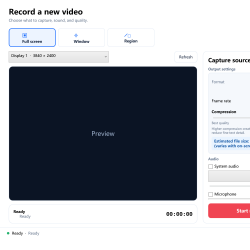
Understand what each recording container is for and choose a format based on playback, editing, web, remux, or legacy compatibility needs.
Use start and end handles, preview positioning, fast or precise trimming, and sensible GIF frame-rate and width settings.
Choose between Windows Snipping Tool, Xbox Game Bar, and a dedicated recorder based on the capture, audio, editing, format, and scheduling workflow.
Set a one-time or daily screen recording with a clear start time, duration, tested source, and reliable unattended PC setup.
Capture one application window while keeping the desktop, other apps, and unrelated activity out of the video.
Create a clear screen-and-webcam tutorial with sensible camera placement, readable content, and balanced narration.
Reduce recording size by choosing the right source, frame rate, compression, audio, format, and duration while protecting text clarity.
One of the major problems a teacher can face is to be in a classroom where your students are not picking up the knowledge you are trying to impact, maybe they could, but they may not interested in giving you the attention you need. It could be frustrating, but have you tried virtual teachings? Ok![…]

It’s a common habit of modern people to search the web to get knowledge for solving their problems. Audio, video & text contents are available on the web with huge information! People became dependent on computers and can do most of the works using computers! Distance is really not a factor because people can record[…]

There are some perks people do not often know about that could solve an enormous amount of problems when dealing with a computer. People often do not imagine they have an app on the internet that allows them to capture frame by frame a piece of recording they could probably use in the future. All[…]